Access via AI Agents
AI coding agents running on your local machine, such as Claude Code, OpenCode, and Codex CLI, can execute remote commands over SSH. If they connect directly to dcc-login.oit.duke.edu, those commands run on a shared login node.
As with Access via VS Code, an SSH host alias backed by the auto-provisioning proxy directs those commands to a Slurm compute node instead.
Prerequisites
- A DCC account with SSH key access already configured. See SSH Keys Guide if you haven't set this up yet.
- A coding agent installed locally, e.g., OpenCode, Codex CLI, or Claude Code.
Step 1: Add a Dedicated SSH Host for Agent Sessions
Create a local SSH control-socket directory once,
Then add a Host block to ~/.ssh/config, using its own --name agent and a longer idle timeout than the interactive VS Code profiles. Replace DUKE_NETID with your Duke NetID.
Host dcc-agent
    User DUKE_NETID
    ProxyCommand ssh -o ConnectTimeout=300 DUKE_NETID@dcc-login.oit.duke.edu 'bash /usr/local/bin/dcc-ssh-proxy.sh --name agent --partition scavenger,common'
    ConnectTimeout 300
    StrictHostKeyChecking no
    UserKnownHostsFile /dev/null
    LogLevel ERROR
    ServerAliveInterval 30
    ControlMaster auto
    ControlPersist 30m
    ControlPath ~/.ssh/sockets/%r@%h-%p
If your agent requires GPU access, add a second alias,
Host dcc-agent-gpu
    User DUKE_NETID
    ProxyCommand ssh -o ConnectTimeout=300 DUKE_NETID@dcc-login.oit.duke.edu 'bash /usr/local/bin/dcc-ssh-proxy.sh --name agent-gpu --partition scavenger-gpu,gpu-common --gres gpu:1'
    ConnectTimeout 300
    StrictHostKeyChecking no
    UserKnownHostsFile /dev/null
    LogLevel ERROR
    ServerAliveInterval 30
    ControlMaster auto
    ControlPersist 30m
    ControlPath ~/.ssh/sockets/%r@%h-%p
Step 2: Point your Agent at the Alias
All remote commands issued by the agent must target dcc-agent or dcc-agent-gpu, not dcc-login.oit.duke.edu. For example,
and for a GPU command,
Tell the agent to use these aliases through its project-level instruction file, as described below.
Add an Agent Instruction File
Many coding agents support a project-level instruction file such as AGENTS.md. Add the following content to the file in your project root.
# Remote Execution Policy: DCC

- Never run commands directly on `dcc-login.oit.duke.edu`. The DCC login nodes are not meant for computation.
- For any command that needs to run on DCC, use:

                ssh dcc-agent '<command>'

- For any command that needs to run on DCC that requires GPUs, use:

                ssh dcc-agent-gpu '<command>'

    This transparently provisions or reuses a Slurm compute job and proxies the connection to it. You do not need to run `sbatch`, `salloc`, or `srun` yourself.

- The first command after a period of inactivity may take several seconds while a new job is provisioned. This is expected; do not treat it as a failure.
- Do not run `scancel` on these jobs unless explicitly asked to. An idle watchdog ends the job automatically once nobody has run a command through `dcc-agent` or `dcc-agent-gpu` for a while.

## SSH control socket directory

`dcc-agent` and `dcc-agent-gpu` use SSH connection multiplexing with `ControlPath ~/.ssh/sockets/%r@%h-%p`. `ssh` does not create parent directories for that path, so if `~/.ssh/sockets` is missing, every connection fails immediately with:

    unix_listener: cannot bind to path /Users/USERNAME/.ssh/sockets/USERNAME@dcc-agent-22.<random>: No such file or directory

This is a local setup problem, not a DCC or Slurm problem — do not retry, do not provision a job. Fix it with:

    mkdir -p ~/.ssh/sockets && chmod 700 ~/.ssh/sockets

Mode 700 is required. A live control socket accepts new channels on an already-authenticated session without presenting any credential, so anyone able to reach it inherits the connection.
Tool-specific filenames
The filename of the agent instruction file varies by tool. For example, Claude Code uses CLAUDE.md instead of AGENTS.md. Consult your agent's documentation and use the filename it expects.
Customizing the Agent Profile
Set these options as flags in the ProxyCommand in ~/.ssh/config.
| Flag | Default | Meaning |
|---|---|---|
--partition |
scavenger,common |
Slurm partition(s) to submit to (comma-separated list) |
--account |
(none) | Slurm account, if required by your partition |
--qos |
(none) | Slurm QoS, if required |
--gres |
none |
GPU request, e.g. gpu:1, gpu:h200:1; none = CPU-only |
--cpus |
4 |
CPUs to allocate |
--mem |
16G |
Memory to allocate |
--time |
8:00:00 |
Hard wall-time cap on the job |
--idle-min |
15 |
Minutes of no connection before idle cleanup (0 disables idle cleanup) |
--wait |
240 |
Seconds to wait for a new job to start |
--name |
vscode |
Use agent or agent-gpu to keep agentic workflows separate from other sessions |
--log |
/dev/null |
Where to send Slurm job stdout/stderr (set a path to debug) |
For example, add --mem 128G to the GPU profile's ProxyCommand to request 128 GB of memory.
--idle-min 0 disables idle-based cleanup
Setting --idle-min 0 prevents the watchdog from ending an idle job. The allocation remains active until you cancel it or it reaches the --time wall-time limit (8 hours by default).
Ending Sessions
After the shared SSH connection closes, the watchdog ends the job when its heartbeat has been stale for --idle-min minutes. With the configuration above, ControlPersist keeps that connection open for 30 minutes after the last command. You don't need to run scancel manually in normal use.
To end a session immediately instead of waiting for the idle timeout, or if you set --idle-min 0, SSH to DCC and cancel the job,
How it Works
Without this configuration, an agent that sends commands to dcc-login.oit.duke.edu runs them on a shared login node. Login nodes are intended for file management, job submission, and other lightweight tasks; computational workloads should run on compute nodes.
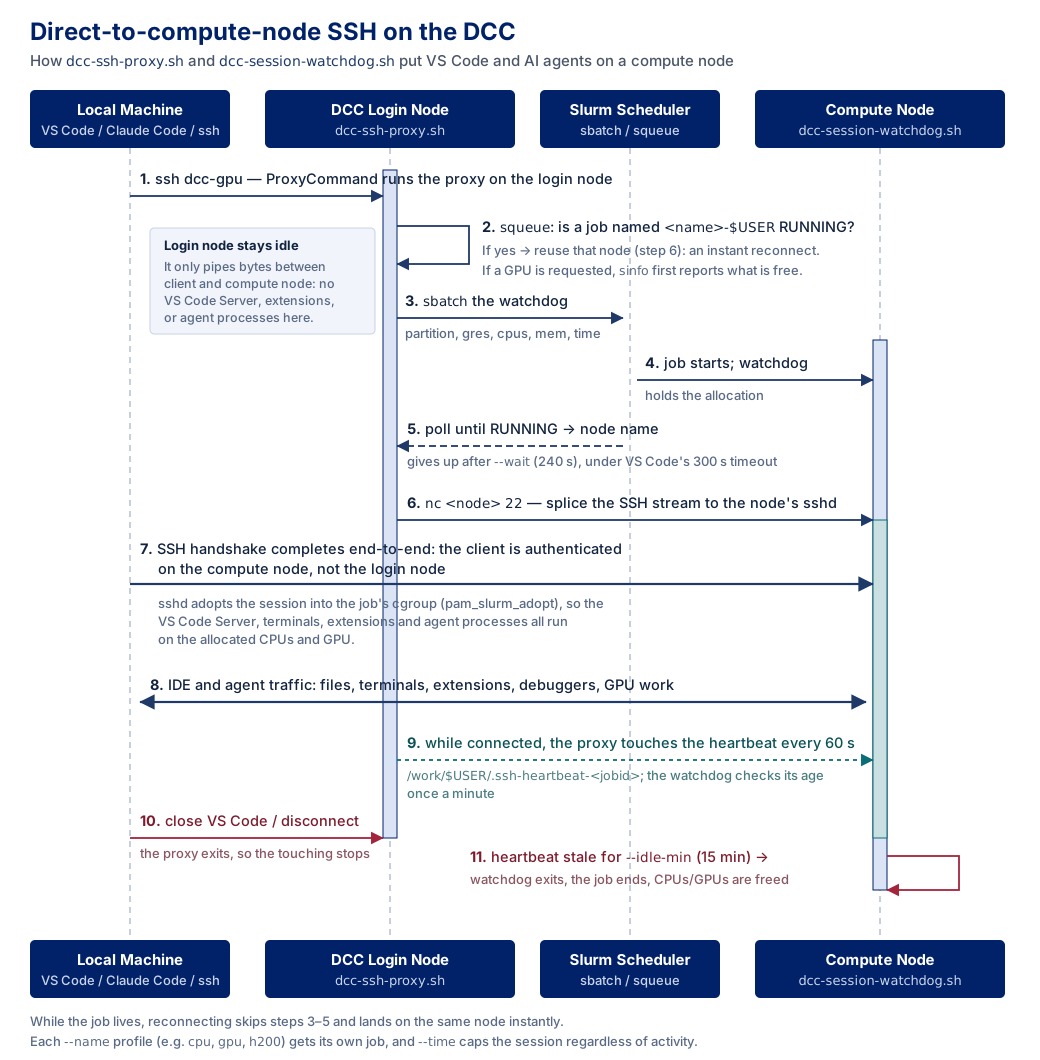
The required scripts, dcc-ssh-proxy.sh and dcc-session-watchdog.sh, are installed centrally in /usr/local/bin. When an agent connects through dcc-agent or dcc-agent-gpu:
- SSH connects to a login node and runs
dcc-ssh-proxy.shthrough the configuredProxyCommand. - The proxy reuses a running Slurm job for that profile or submits a new job and waits for its allocation.
- The proxy carries the SSH connection to port 22 on the allocated compute node.
- Commands sent through the alias therefore execute on the compute node rather than the login node.
The Slurm job runs dcc-session-watchdog.sh. While the proxy connection remains open, the proxy updates a heartbeat file. After the connection closes and the heartbeat becomes stale, the watchdog ends the job after the configured --idle-min period. Setting --idle-min 0 disables idle-based cleanup. The job then runs until it is cancelled or reaches its wall-time limit.
The diagram below traces a single connection, from the ProxyCommand on the login node through to the agent's commands running inside the Slurm job.
Reusing SSH Connections
Agents commonly start a new ssh process for each remote command. The following options let those processes share one underlying SSH connection:
ControlMaster autoreuses an existing shared connection when one is available. The first connection creates it, and later connections to the same host alias use it instead of reconnecting.ControlPersist 30mkeeps the shared connection open in the background for 30 minutes after the last command finishes.ControlPath ~/.ssh/sockets/%r@%h-%pspecifies the local socket used to find the shared connection.%r,%h, and%pexpand to the remote username, host, and port, keeping connections for different aliases separate.
The first command must authenticate, run the proxy, and possibly wait for a Slurm allocation. Commands issued while the shared connection remains open reuse it immediately and do not rerun the proxy.
Connection persistence and idle cleanup
ControlPersist keeps the proxy connection and its heartbeat active. The --idle-min countdown effectively begins after the shared connection closes. With ControlPersist 30m and --idle-min 15, the allocation may remain active for approximately 45 minutes after the last command. Use a shorter ControlPersist value if faster cleanup is more important than connection reuse.
Troubleshooting
Every command seems to re-provision a new job
Check that each command uses the same host alias and --name, and that the gap between commands does not exceed the combined connection-persistence and idle periods. ControlMaster improves connection speed, but the proxy can still reuse a running Slurm job without it.
How do I confirm the agent isn't running on a login node?
Ask the agent to run ssh dcc-agent hostname. It should print a compute node name, never a dcc-login hostname.
Acknowledgements
This guide was adapted from PSC's Launching Remote IDEs on Bridges-2 Compute Nodes documentation and was enhanced with the help of Joe Shamblin at Duke University.